LIVE ON MACOS · MENU BAR + FLOATING WINDOW
Command Room app icon

MONITOR YOUR AI STACK
IN REAL TIME

A floating macOS desktop dashboard that watches every AI tool and coding app you run — which ones are active, which are waiting on you, and whether it's time to step away — all from one retro sci-fi command-center window.

MACOS 13+ · APPLE SILICON & INTEL · RELEASE COMING SOON
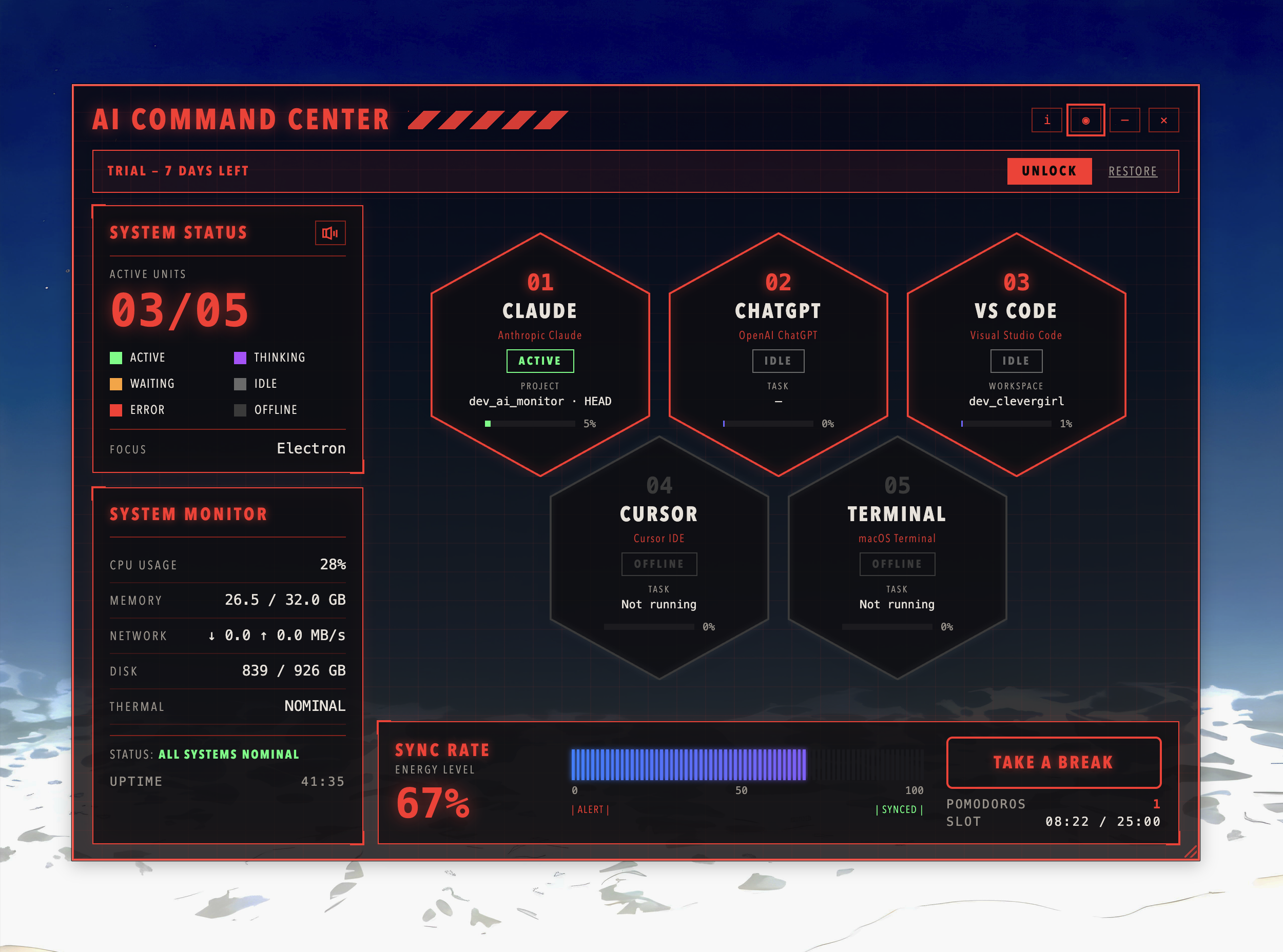
Command Room dashboard tracking Claude, ChatGPT, VS Code, Cursor and Terminal in real time

Shrink It To A Sidebar

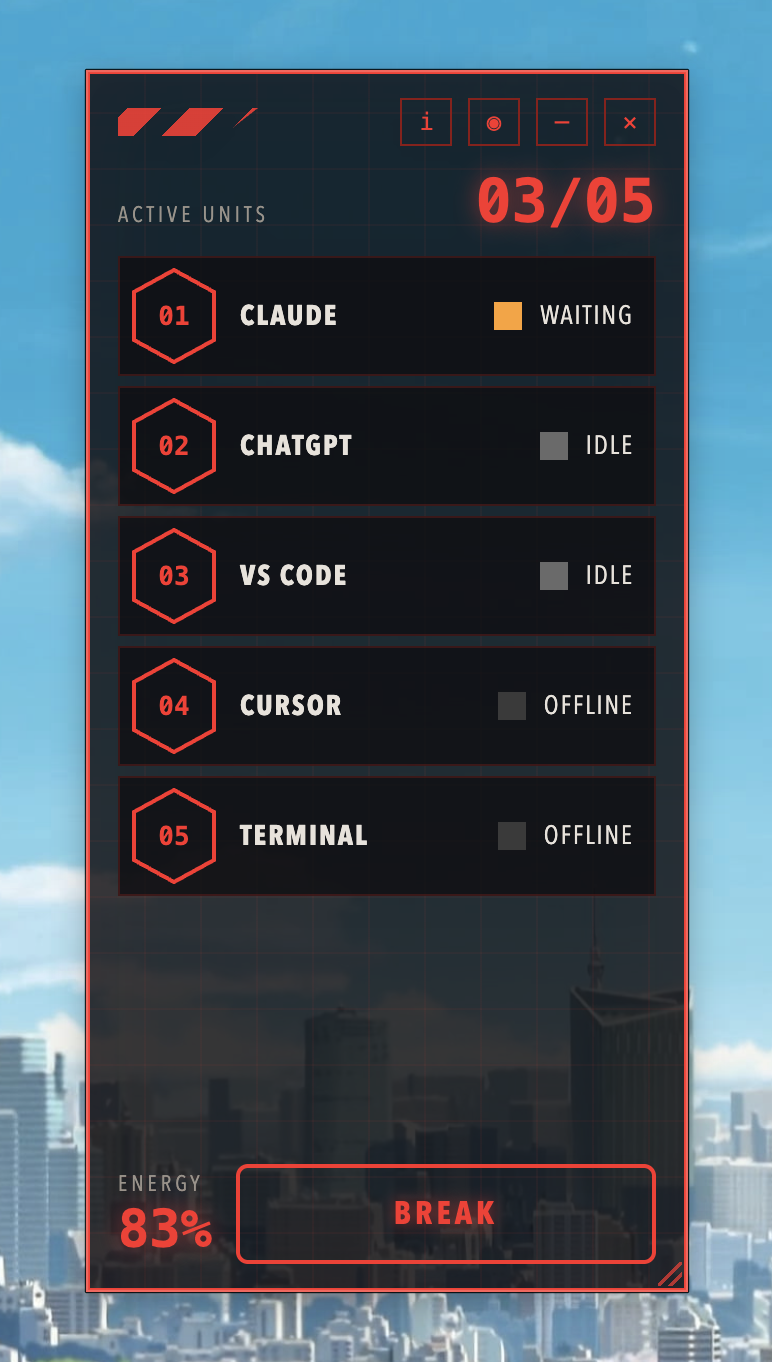
Don't need the full grid? Collapse Command Room into a slim vertical panel that still surfaces every unit's status, energy level, and a one-tap break button — parked quietly on the edge of your screen while you work.

Command Room compact vertical panel showing status for all five units

Every Tool, One Glance

Six states cover everything your stack could be doing — color-coded, glowing, and impossible to miss.

Active
running & working
Thinking
high CPU, crunching
Waiting
quiet, needs input
Idle
running, nothing notable
Error
tool reported failure
Offline
app isn't running

What The HUD Actually Reads

Real numbers, pulled live from your Mac — not a mock dashboard.

%

Unit % / Bar

The percentage on each hexagon is that app's live CPU usage, summed across all its processes (main + helpers) and smoothed. It's also what drives the status label above.

Energy Level (Sync Rate)

A rest battery tied to the Pomodoro clock. Starts at 100% right after a break and drains to 0% over the 25-minute work slot. At 0% the bar turns red and pulses — time to rest.

Pomodoros

How many full 25-minute focus slots you've completed this session. Take A Break starts a 5-minute break (blue cool-down theme); click again to resume early.

System Monitor

Live CPU, memory, network throughput, disk usage, and thermal state of this Mac. Focus shows your current frontmost app.

Privacy

Anonymous usage data (feature and screen events, never personal info, file names, or your monitored apps' contents) helps improve the app. Turn it off anytime via the app menu.

Supported Apps

Auto-detects Claude, ChatGPT, VS Code, Cursor, and Terminal out of the box — no manual setup, no config files.
Built Like a Command Center

Not another rounded-corner dashboard. A dedicated HUD that floats above your desktop and never gets in the way.

Live Tool Tracking

Auto-detects Claude, ChatGPT, VS Code, Cursor, and Terminal — no manual setup, no config files.

Waiting-On-You Alerts

Instantly see which app has been idle waiting for your input, so nothing stalls silently in a background tab.

Energy Gauge

A segmented blue-to-purple meter that tracks your session intensity and nudges you before you burn out.

Work / Break Retheme

The entire HUD swaps from red to blue the moment you switch to break mode — a visual cue you can't ignore.

Honeycomb Layout

Hexagonal unit cards, numbered and glow-coded by status — scan your whole stack in under two seconds.

Floating & Frameless

Translucent, always-on-top window that sits quietly over your desktop without stealing focus.

Three Steps to Full Visibility

01

Install & Launch

Download the app, grant accessibility permissions, and the command center window appears on your desktop.

02

Auto-Detect Your Stack

Command Room scans for AI tools and coding apps already running and slots them into the honeycomb automatically.

03

Monitor & Rest

Glance at status, respond to what's waiting, and let the energy gauge tell you when it's time for a break.

Flip the Switch

The whole UI retheme's when you rest. Try it below.

// WORK MODE ENGAGED
Red HUD active. Your stack is being tracked at full intensity.

Put Your Stack Under Command

Command Room is in final testing. Like the post and stay tuned — you'll be first to know when it's live.

MANYAPPS.WORK · MACOS 13+ · APPLE SILICON & INTEL